Mengatasi Pencurian Konten dengan DMCA. Kali ini, pencurian konten artikel semakin marak terjadi. Artikel yang kita buat susah payah dengan cucuran keringat dan membutuhkan waktu 2-3 jam dengan sekejap dicuri oleh orang lain. Anda akan mengetahui betapa sakitnya kita mengetahui konten kita dicuri oleh pihak yang tidak bertanggung jawab. Lebih sakit lagi jika ada artikel curian justru mengalahkan posisi artikel orginal kita. Rasanya ingin marah di atas mukanya.
Apa dampaknya terhadap kita? Pencurian konten tidak hanya mengurangi popularitas kita, bahkan merugikan dan menjatuhan situs kita.
Untuk mengatasi hal tersebut, kita bisa melaporkannya ke Google DMCA agar situs mereka tidak di deindex oleh search engine.
Atau bahkan secara permanen situs mereka lenyap dari search engine.
Bukan kejam, tetapi ini langkah terakhir jika mereka tidak mengindahkan
peringatan yang kita buat.
Satu pengalaman, saya memerikan tugas murid-murid untuk mencari artikel. Kebetulan artikel yang dia dapatkan sangat saya kenali dengan persis karena artikel tersebut yang membuat adalah saya sendiri. Tapi alangkah terkejutnya, dia mengaku mendapatkan bukan dari blog saya. Dari situ saya telusuri dan ternyata benar, artikel saya dikopi sama persis. Saya coba melaporkan 1 artikel sebagai sampel ke DMCA dan mendapatkan tanggapan yang baik. Setelah dicek beberapa hari, yang terjadi tidak hanya artikel tersebut yang hilang, bahkan blognya menjadi korban (akun blog dihapus oleh pihak blogger).
MAKA BERHATI-HATILAH ANDA!
Jika sebuah blog mendapat banyak komplain secara terus menerus karena
kasus pencurian konten, Blogger kemudian akan mempertimbangkan tindakan
lanjutan berupa penghapusan blog tersebut dari layanan Blogger.
Cara Melaporkan Pencurian ke DMCA
2. Isikan data anda pada Contact Information seperti contoh gambar di bawah ini.

3. Pada bagian Your Copyrighted Work, anda akan diminta untuk memasukkan url konten asli blog anda serta url pencuri artikel.
- Pada Where can we see an authorized example of the work?* isi dengan URL artikel asli anda. Buat baris
baru jika lebih dari satu. - Pada Identify and describe the copyrighted work* isi dengan penjelasan singkat tentang kapan artikel saudara diterbitkan. Saran saya, isikan dengan detail copyright konten dengan melampirkan url yang memuat hak cipta seperti seperti myfreecopyright.com atau DMCA. Lihat gambar di bawah ini.

4. Pada bagian Allegedly Infringing Material masukkan URL-URL pencuri artikel anda. Pastikan URL tersebut mengandung konten yang sama dengan artikel anda. Jangan khawatir jika tanggal pembuatan konten curian dibuat maju (back date) sebab blogger memiliki data sesungguhnya kapan artikel
tersebut dibuat. Klik 'add an additional field' untuk menambahkan form baru apabila url lebih dari satu.

5. Jangan lupa pada bagian Sworn Statement beri tanda centang pada kedua check box untuk mengkonfirmasi pernyataan bahwa anda lah pemilik konten sah.

6. Pada bagian Signature isikan tanggal pembuatan surat komplain dan
tandatangan digital (digital signature) berupa nama lengkap persis
seperti nama yg telah diisikan di atas.

7. Klik "Submit".
Tanpa menunggu lama, anda akan mendapatkan pemberitahuan emaildari removals@google.com seperti gambar di bawah ini.

Finish. Anda telah Mengatasi Pencurian Konten dengan DMCA.
Mengetahui berat blog adalah sesautu hal yang sangat penting. Apabila blog kita sangat berat, hal itu akan berpengaruh pada loading blog yang sangat lama. Pastinya hal ini akan sangat merugikan kita karena visitor tidak akan sabar menunggu loading blog kita yang sangat lama, apalagi koneksi yang pas-pasan.
Terus, bagaimana caranya mengukur berat blog kita dan mengetahui waktu yang dibutuhkan untuk meload blog kita?
Ada beberapa tools online service yang menyediakan jasa untuk test kecepatan atau Mengukur Berat Dan Loading Blog
atau website, namun ingat hal ini tidak termasuk : koneksi internet
yang memang lambat , komputer kita yang memang lemot n jadul dan
kesalahan alam lainnya , tool tersebut diantaranya :
1. Tool Stopwatch : Tool ini sangat bermanfaat untuk mengecek berapa detik loading blog kita
2. Tool Pingdom
: Pingdom merupakan tool yang mempunyai fitur lumayan komplit dan rinci. Tool ini menampilkan grafik
tentang lamanya loading dari semua objek link yang ada dalam blog kita
3. Pakai WebSiteOptimization.com.
Yang ini hasilnya akan lebih komplit lagi, kita dapat mengetahui
seberapa cepat waktu loading sebuah website apabila diakses menggunakan 6
kecepatan koneksi internet. Hasil tes juga disertai dengan analisis
website yang dapat dipakai sebagai acuan untuk optimasi website lebih
lanjut.
4. Pakai Iwebtool speed test : Tinggal masukan URL Blog , klik Submit nanti akan tahu seberapa berat Sizze nya (KB) dan berapa lama loadingnya (seconds).
Untuk Mengukur Berat Dan Loading Blog atau web anda, silahkan masukan URL nya di sini.
Cara Mendapatkan Backlink berkualitas dari W3 Directory. Salah satu cara untuk meningkatkan page rank blog kita adalah dengan cara mendapatkan banklink yang berkualitas. Salah satu backlink berkulitas internasional adalah W3 Directori. Situs W3 Directory adalah situs yang berisi directory-directory web atau blog berkualitas yang tersebar di seluruh penjuru dunia.

Keuntungan kita ketika mendapatkan baclink dari situs web berpage rank tinggi adalah blog kita sangat cepat perkembangannya menjadi blog dengan page rank tinggi. Terus, bagaimana mendapatkan backlink berkuliatas tersebut?
Langkah-langkahnya sebagai berikut.
- 1. Pertama-tama, log in untuk mendaftar ke website W3 Directory. Klik di sini
- 2. Setelah masuk ke website nya, pilih menu tab “Add a web site”.
- 3. Isi form untuk Add a web site tersebut:
- URL : alamat blog/link blog anda.
- Title : nama blog anda.
- Description : deskripsi blog anda.
- Keywords : kata kunci yang menggambarkan blog anda.
- Identity : isi dengan nama Anda.
- Email : email anda(valid).
- Return link/back link : link untuk mendapatkan backlink dari w3 directory, isi sesuai URL blog anda.
- Country : Indonesia.
- Heading 1: kategori utama untuk blog anda
- Heading 2: kategori kedua untuk blog anda
- Heading 3: kategori ketiga untuk blog anda
- 4. Kemudian klik Submit my web site
Catatan : setiap ada tanda bintang (*) artinya wajib diisi.
Cara kerja backlink ini bersifat dua arah. Anda akan mendapatkan backlink berkualitas dari W3 Directory ketika banyak yang melakukan vote ke w3 directory tersebut. Semakin banyak yang melakukan vote, maka kita akan mendapatkan ribuan backlink berkualitas dari directory-directory website berualitas. Untuk tips saja, anda boleh menyebarkan link ke sosial media seperti facebook, twitter, dan lain sebagianya. Buat pengunjung penasaran dan akhirnya meng-klik url vote anda.
Demikianlah sedikit ulasan mengenai Mendapatkan Backlink berkualitas dari W3 Directory. Semoga bermanfaat.
Cara Mengetahui Link Blog Kita Dipasang Di Blog Lain. Hai sobat blogger, kali ini Science And Education akan membagikan tips untuk mengetahui siapa saja yang menanamkan link website kita pada websitenya.
Tukar link sudah menjadi hal biasa di kalangan para blogger. Tidak ada salahnya Admin mencoba share, sebab ada salah satu pengunjung yang bertanya bagaimana caranya. Membahas mengenai saling tukar link, hal tersebut dimaksudkan untuk saling meningkatkan page rank blog masing-masing. Biasanya memasang link sahabat menggunakan blogroll atau mempersingkatnya dengan textarea. Karena terlalu banyaknya sahabat-sahabat yang kita ajak bertukar link, maka kita lupa siapa saja yang memasang link blog kita di blog lain.
Nah…. untuk mengetahui siapa saja yang memasang link blog kita di blog lain, berikut ada sedikit trik yang sangat-sangat mudah.
1. Buka halaman pencarian google.
2. Masukan keyword seperti di bawah ini dalam kotak pencarian google (tanpa tanda petik). Silakan ganti tulisan yang berwarna hijau dengan alamat blog masing-masing.
“link:http://aurigamaulana.blogspot.com/”
3. Kemudian tekan tombol [Search] atau [Telusuri].
Maka akan ditampilkan daftar-daftar blog yang memasang link kita, jika masih kurang yakin silahkan klik salah satu hasil pencarian. Apakah benar di blog itu terdapat link kita.
Demikianlah Cara Mengetahui Link Blog Kita Dipasang di Blog Lain. Semoga bermanfaat.

Cara Mendaftar dan Claim Token Blog di Technorati. Artikel ini sebagai salah satu syarat agar terverifikasinya akun kita di
Technorati dan sebagai informasi bagi para blogger untuk meningkatkan
backlink melalui technorati. Bagi kebanyakan blogger, service ini
mungkin sudah sangat dikenal. Sedangkan bagi blogger pemula seperti
saya, service ini mungkin harus diketahui dan digunakan.
Berdasarkan informasi dari beberapa sobat blogger,
dan dari isi menu technorati, dapat ambil empat point penting yang
menunjukkan apakah technorati itu. Yaitu technorati sebagai Blog/RSS directory,
technorati sebagai blog search engine (khusus blog), technorati sebagai
online borkmarking dan mungkin technorati sebagai tag aggregator.
Disini kita ketahui bahwa technorati merupakan service yang berfokus
pada blog. Jadi sebagai seorang blogger, sangat disayangkan jika tidak mengetahui hal ini.
Dengan menggunakan service ini, blog kita akan dicrawl dan disimpan
dalam data blog technorati, import otomatis RSS feed blog kita, deteksi
tag-tag, juga link dari blog lain menuju blog kita. Lagi-lagi menyangkut
masalah backlink (Link popularity) dan rangking blog di Google atau search engine.
Fokus kali ini adalah kepada cara mendaftar dan claim blog di technorati. Dan berikut ini adalah Cara Mendaftar dan Claim Token Blog di Technorati, hingga selesai proses validasi code token technorati:
Step 1.
Pertama Anda harus membuat account terlebih dahulu, buka link pendaftaran disini!
Step 2.
Lengkapi datanya dengan baik, gunakan email yang aktif, dan jangan
lupa isi captcha dan isi centang agreement-nya, lalu klik “Join”
Step 3.
Untuk melakukan aktifasi, sekarang buka email yang Anda gunakan
untuk mendaftar tadi Buka email dari technorati dan klik link
aktifasinya, Setelah account Anda aktif, cari dan klik “sign in” untuk
masuk ke halaman profil dan selanjutnya melakukan claim blog.
Step 4.
Sudah masuk? sudah isi username dan password dengan benar? Jika
sudah, sekarang masuk ke halaman profile dengan klik pada link nama
(account) Anda disamping photo profil.
Step 5.
Mulai claim blog, dibawah profil Anda, isikan url blog pada Start a
blog claim, isikan misalnya http://tokotuaforex.blogspot.com, lalu klik
“Claim”
Step 6.
Halaman selanjutnya, isi formulir dengan benar,
Step 7.
Blog tittle: isi dengan tema blog Anda, misal blog ini temanya adalah “Science And Education”
Step 8.
URL: alamat blog, misal http://aurigamaulana.blogspot.com/
Step 9.
Feed:
rss feed blog, boleh alamat default seperti
http://nama blog anda.blogspot.com/feeds/posts/default, atau service pihak
ketiga semisal feedburner,
Step 10.
Linking blogs: disini dapat dicantumkan tiga blog yang memiliki link menuju blog Anda, boleh tidak diisi,
Step 11.
Site description: keterangan blog, sesuaikan dengan tema blog,
Step 12.
Site categories: beri tanda centang pada kategori yang sesuai dengan blog Anda, Anda dapat memilih lebih dari satu kategori,
Step 13.
Site tags: isi setiap sel dengan kata kunci yang berhubungan dengan isi blog Anda. Bisa satu kata maupun lebih per selnya.
Step 14.
Lalu klik “Proceed to next the step”
Step 15.
Pada halaman selanjutnya, yaitu halaman blog claim status, klik tombol “Return to profile”
Step 16.
Lihat di bawah profil Anda, sekarang blog Anda sudah terdaftar,
hanya saja masih dibutuhkan verifikasi kode token. Oleh karena itu,
untuk mulai claim token, klik “Check Claim” di bawah gambar thumbnail
blog Anda.
Step 17.
Dihalaman selanjutnya dapat Anda lihat teks dengan latar biru, yaitu XD7242969SPV
(ini contoh kode token saya) atau bisa dicek di kotak masuk email Anda (berbeda untuk tiap blog) ,
adalah kode token yang harus kita tulis di halaman blog kita.
Step 18.
Posting sebuah artikel yang berisi kode token tersebut, lalu
publish. Postingan terserah Anda, bisa halaman kosong hanya berisi kode
token atau sekalian artikel seperti yang sedang Anda baca ini. Boleh kok
copy paste asal dituliskan link sumber ke halaman ini.
Step 19.
Setelah yakin postingan itu terpublikasi, sekarang klik tombol
“Verify Claim Token” pada halaman claim technorati, dan lihat hasilnya.
Demikian artikel tentang Cara Mendaftar dan Claim Token Blog di Technorati, Semoga berhasil dan bermanfaat buat kita semua!
Pengaturan tag H1-H2-H3-H4-H5-H6 dalam Optimasi SEO sangat penting. Hal tersebut berkaitan dengan cara Search Engine mengindeks blog kita. Sistem pengindeksan template blog oleh search engine dimulai dari tag H1 diteruskan sampai tag terakhir yakni tag H6. Oleh karena itu, pengaturan tag H dalam template blog sangat vital mempengaruhi page rank selain usaha kita untuk mengoptimasi alexa.

Selector H1
- Heading (Judul Blog)
- Judul Postingan atau artikel pada posisi Single Post
Selector H2
- Sub Heading atau Deskripsi Blog (Jika mengandung keyword)
- Sub Sub Heading atau Judul Postingan
Selector H3
- Pada Judul Artikel Postingan
- Heading pada posisi Single Post (posisi bertukar dengan judul postingan yang menjadi tag H1)
Selector H4
- Pada menu Sidebar seperti Categoy, Blogroll, Recent Post, Related Post, Label, Following List dll.
- Pada tulisan ''16 Respons to Bla...bla....bla....'' pada bagian Komentar
Selector H5
- Nama pengomentar yang berupa link (pada kolom komentar)
Selector H6
- Pada Footer seperti ''Powered by : Science And Education''
Berkaitan dengan penjelasan di atas, pasti ada yang bertanya bagaimana membuat tag H1 untu judul postingan pada posisi single post dan judul blog menempati posisinya menjadi H3. Berikut tutorialnya.
Mengatur Tag H1, H2, H3, H4, H5, H6
1. Merubah tag Judul Blog menjadi h1 pada homepage dan h3 pada halaman posting.
Cari kode:
<div class='titlewrapper'
dst..
dst..
dst..
</div>
Ganti semua kode di atas dengan kode ini :
<div class='titlewrapper' style='background: transparent'>
<b:if cond='data:blog.pageType != "item"'>
<h1 class='title' style='background: transparent; border-width: 0px'>
<b:include name='title'/></h1>
<b:else/>
<h3 class='title' style='background: transparent; border-width: 0px'>
<b:include name='title'/></h3>
</b:if>
</div>
Note: Pada beberapa template mungkin terdapat lebih dari 1 kode <div class='titlewrapper', ganti semuanya dengan kode di atas!
2. Merubah tag Deskripsi Blog menjadi h2
Cari kode :
<div class='descriptionwrapper'>
dst...
dst..
dst...
</div>
Ganti menjadi :
<div class='descriptionwrapper'>
<h2 class='description'><span><data:description/></span></h2>
</div>
Like step one, jika terdapat lebih dari 1 kode <div class='descriptionwrapper'> ganti semuanya dengan kode di atas!
3. Merubah tag posting menjadi h3 pada homepage, dan menjadi h1 pada halaman posisi single post
a. Merubah tag heading posting menjadi h3 pada homepage :
Cari kode :
<div class='post hentry uncustomized-post-template' , pada 4 atau 5 baris di bawah kode ini akan anda temukan kode seperti ini :
<h? class='post-title entry-title' itemprop='name'>
dst...dst...dst...
dst...dst...
dst...
</h?>
Ganti tag headnya menjadi h3, kalau sudah h3 tidak perlu dirubah.
b. Merubah tag head posting menjadi h1 pada halaman posting (single post)
Cari kode merah tebal yang beberapa baris di atasnya ada kode berwarna hijau seperti di bawah ini:
<b:includable id='post' var='post'>
kode bla...bla...bla...
kode bla...bla...bla...
<a expr:name='data:post.id'/>
<b:if cond='data:post.title'>
<h3 class='post-title entry-title'>
kode bla...bla...bla...
kode bla...bla...bla...
</h3>
</b:if>
<div class='post-header'>
Lalu ganti semua kode yang berwarna merah dengan kode di bawah ini :
<a expr:name='data:post.id'/>
<b:if cond='data:blog.pageType != "item"'>
<b:if cond='data:post.title'>
<h3 class='post-title entry-title'>
<b:if cond='data:post.link'>
<a expr:href='data:post.link'><data:post.title/></a>
<b:else/>
<b:if cond='data:post.url'>
<a expr:href='data:post.url'><data:post.title/></a>
<b:else/>
<data:post.title/>
</b:if>
</b:if>
</h3>
</b:if>
<b:else/>
<h1 class='post-title entry-title'>
<b:if cond='data:post.link'>
<a expr:href='data:post.link'><data:post.title/></a>
<b:else/>
<b:if cond='data:post.url'>
<a expr:href='data:post.url'><data:post.title/></a>
<b:else/>
<data:post.title/>
</b:if>
</b:if>
</h1>
</b:if>
4. Preview lalu save template.
Penting :
Cara Cepat Meningkatkan Trafik Alexa Rank. Sebelumnya, saya sudah memposting artikel tentang 9 Tips Meningkatkan Alexa Rank. Bagi yang belum membacanya, wajib kunjungi terlebih dahulu karena berkaitan dengan artikel ini.
Untuk kali ini, saya akan berbagi cara Paling Efektif meningkatkan Alexa Rank. Untuk mendapatkan bintang lima dari Alexa Secara cepat caranya mudah, website or blog anda harus di review oleh orang lain melalui aleaxa.com. Bagaimana teman anda mereview blog anda, tentunya anda harus mereview blog teman anda juga bukan ? disini saya menjelaskan bagaimana anda mereview Blog saya sehingga nantinya saya juga mereview blog anda, dan langkah ini juga sama halnya jika anda ingin mereview blog teman anda lainnya, Barter gitu deh.ha2.Okay, Lansung Ikuti langkah langkah dibawah ini
- Klik Alexa.com ( Login terlebih dulu )
- Klik site info
- Ketikkan aurigamaulana.blogspot.com
- Get Details
- Reviews
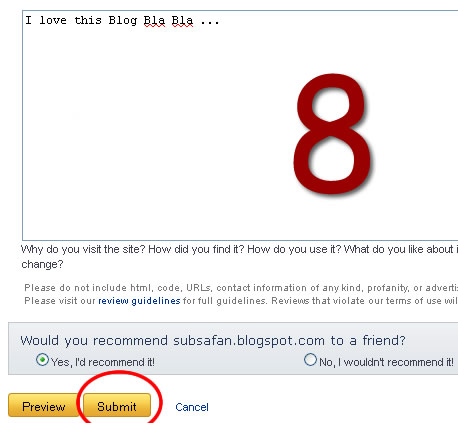
- Write Reviews
- Review Headline di isi dengan aurigamaulana.blogspot.com
- Site Ratig di maksimalkan 5
- dan setelah selasai Klik sumbmit.
Untuk lebih jelasnya silahkan Ikuti gambar dibawah ini :


Itulah langkah langkah anda mereview sebuah blog
teman anda, sehingga teman anda pun juga melakukan hal yang sama seperti
anda.dan langkah inilah yang membuat blog anda cepat meraih bintang lima di bumi google yang luas nan indah itu. Jika anda ingin blognya saya review jangan lupa Untuk review blog saya ini dulu ya. Kalo sudah review blog ini komentar saja dibawah ini.secapat munkin blog sobat saya review
balik.
Oh ya, untuk sobat yang memang sudah mengerti langkah diatas bisa
lansung klik foto dibawah ini supaya bisa review blog ini »

Ditunggu komentar hasil reviewnya sobat disini, Biar saya cek dulu dan pasti saya balas.
Sumber Artikel : subsafan.blogspot.com

Cara Meningkatkan Alexa Rank. Alexa Rank adalah suatu peringkat yang didasarkan kepada banyaknya kunjungan terhadap suatu web atau blog, maka tentu saja semakin banyak pengunjung web atau blog anda, Alexa Rank akan semakin baik. Adapun menurut situs Alexa.com, alexa rank dihitung berbasis aggregat trafik 3 bulanan dari jutaan pengguna Alexa Toolbar dan merupakan sebuah ukuran kombinasi dari page views dan pengunjung. Pada tahap pertama, Alexa menghitung jumlah pengunjung dan jumlah page views untuk semua situs dan blog secara harian. Dari definisi tersebut, maka yang berperan penting dalam alexa rank adalah Alexa Toolbar, jumlah pengunjung, dan jumlah page views yang dihitung berdasarkan jumlah orang yang mengunjungi situs/blog bersangkutan dengan alexa toolbar terinstal di browser yang digunakannya.
Cara Meningkatkan Alexa Rank (berdasarkan pengalaman pribadi) :
1. Tingkatkan jumlah trafik atau kunjungan harian (Daily Traffic) ke blog, karena bisa dibilang sebenarnya inti dari meningkatkan Alexa Rank adalah meningkatkan jumlah trafik atau kunjungan ke web atau blog, ini sesuai dengan data yang ada di site info blog kita yang ada di Website Alexa. Menurut saya penilaian yang paling utama adalah trafik.
2. Tingkatkan Daily Reach atau kunjungan secara global, maksudnya trafik atau jumlah pengunjung akan lebih baik di mata Alexa jika berasal dari IP pengunjung yang berasal dari berbagai macam negara. Caranya anda harus sering mengunjungi dan berkomentar di blog luar negeri atau aktif di forum atau komunitas International, sebagai contoh bisa memanfaatkan blogcatalog, mybloglog, StumbleUpon, digg dll.
3. Tingkatkan Daily Pageview, Bounce dan Time on Site, Caranya yaitu dengan menambahkan link postingan yang saling berkaitan baik di dalam konten atau postingan maupun di bawah postingan atau biasa disebut Related Post atau Posting Terkait. Dengan cara ini akan lebih memberikan kesempatan bagi pengunjung untuk lebih mengekplorasi seluruh isi blog dan menemukan lebih banyak informasi. Cara ini efektif untuk meningkatkan Page View. Link internally ke potingan dalam blog juga akan membantu meningkatkan ranking blog anda dan juga akan membantu meningkatkan trafik, sebab jika orang yang datang ke blog anda tidak ada pilihan lagi untuk dilihat maka mereka akan pergi. Ketika anda membuat link ke postingan yang lain pengunjung akan menemukan banyak pilihan untuk membuka postingan yang lain sehingga mereka akan lebih lama berada di blog anda (meningkatkan Time on Site). Cara lain untuk meningkatkan Time on Site yaitu dengan cara setting link komentator ketika diklik akan terbuka di tab atau halaman baru supaya blog anda masih tetap terbuka (menambah Time On Site).
4. Tingkatkan jumlah trafik atau kunjungan yang berasal dari Search Engine (The percentage of visits to blog that came from a search engine). Meningkatkan jumlah kunjungan dari search engine juga bisa dilakukan oleh pemilik blog yaitu dengan mengetikkan keyword atau postingan yang populer di blog sendiri terutama postingan yang mempunyai SERP yang tinggi syuku-syukur yang ada di halaman satu hasil SERP search engine (High Impact Search Queries). Gunakan IP yang berbeda per harinya bisa menggunakan browser dekstop, opera mini, browser bawaan ponsel, Firefox Mobile, Bolt For Mobile dll. Jangan gunakan tools-tools seperti alexa booster, traffic generator dan sebagainya. Seumpama Alexa tinggi pun percuma, kalo dibuat untuk blog PPC jelas-jelas tidak mungkin ada klik karena pengunjung anda hanyalah robot-robot yang datang dari mesin-mesin generator traffic.
5. Pasang Alexa Toolbar di browser internet yang kita pakai dan pasang juga Alexa Widget di blog. Dengan memasang Alexa Toolbar dan Alexa Widget akan memberikan data trafik yang lebih akurat.
6. Setting Web atau Blog anda menjadi Home Page di browser internet yang biasa anda gunakan.
7. Buatlah tulisan atau postingan mengenai Alexa, dengan membuat tulisan tentang Alexa, maka para pengunjung setia blog anda akan tertarik menggunakan tool Alexa, ini tentunya menguntungkan karena data yang masuk ke Alexa juga akan semakin lancar.
8. Rajin update Blog atau membuat postingan baru dan usahakan untuk konsisten. Pengunjung dan search engine akan lebih senang mengunjungi blog yang selalu up to date serta konsisten atau kontinu. Kalau tidak bisa posting tiap hari ya 2 hari sekali atau seminggu sekali tapi konsisten, akan lebih baik dari pada posting tiap hari selama satu minggu tapi setelah itu blog dibiarkan tanpa update. Jika blog jarang diupdate biasanya trafik pengunjung cenderung akan turun terutama untuk blog baru yang jumlah trafiknya belum cukup stabil.
9. Minta teman untuk mereview dan merating profil blog Anda di Alexa. Cara ini ternyata cukup signifikan untuk merampingkan Alexa Rank. Caranya klik aja banner di bawah ini, setelah ada di halaman review silahkan Login terlebih dahulu dengan menggunakan akun Alexa atau bisa juga menggunakan akun Facebook. Setelah anda mereview blog saya, maka saya akan mereview juga blog anda.
Mudah-mudahan tulisan tentang Cara Meningkatkan Alexa Rank ini bisa bermanfaat untuk anda, terima kasih.

Membuat Internal Link Otomatis
Untuk membuat internal link secara otomatis, perhatikan langkah-langkah berikut:
- Pertama, login blogger > design > edit HTML > lalu centang Expand Widget Templates
- Cari kode
Thanks for reading: <a expr:href='data:post.link' expr:title='data:post.title'><data:post.title/></a>
Menjadi seperti ini:
<data:post.body/>
Thanks for reading: <a expr:href='data:post.link' expr:title='data:post.title'><data:post.title/></a>
- Simpan dan selesai. Lihatlah hasilnya Semoga info ini bermanfaat
Tambahan:
NOTE: This post replaces a popular one I wrote on the same topic in 2007. This post is intended to be useful to all forms of bloggers - independent folks, those seeking to monetize, and marketing professionals working an in-house blog from tiny startups to huge companies. Not all of the tactics will work for everyone, but at least some of these should be applicable and useful.
1 - Target Your Content to an Audience Likely to Share
When strategizing about who you're writing for, consider that audience's ability to help spread the word. Some readers will naturally be more or less active in evangelizing the work you do, but particular communities, topics, writing styles and content types regularly play better than others on the web. For example, great infographics that strike a chord (like this one), beautiful videos that tell a story (like this one) and remarkable collections of facts that challenge common assumptions (like this one) are all targeted at audiences likely to share (geeks with facial hair, those interested in weight loss and those with political thoughts about macroeconomics respectively).
If you can identify groups that have high concentrations of the blue and orange circles in the diagram above, you dramatically improve the chances of reaching larger audiences and growing your traffic numbers. Targeting blog content at less-share-likely groups may not be a terrible decision (particularly if that's where you passion or your target audience lies), but it will decrease the propensity for your blog's work to spread like wildfire across the web.
2 - Participate in the Communities Where Your Audience Already Gathers
Advertisers on Madison Avenue have spent billions researching and determining where consumers with various characteristics gather and what they spend their time doing so they can better target their messages. They do it because reaching a group of 65+ year old women with commercials for extreme sports equipment is known to be a waste of money, while reaching an 18-30 year old male demographic that attends rock-climbing gyms is likely to have a much higher ROI.
Thankfully, you don't need to spend a dime to figure out where a large portion of your audience can be found on the web. In fact, you probably already know a few blogs, forums, websites and social media communities where discussions and content are being posted on your topic (and if you don't a Google search will take you much of the way). From that list, you can do some easy expansion using a web-based tool like DoubleClick's Ad Planner:
Once you've determined the communities where your soon-to-be-readers gather, you can start participating. Create an account, read what others have written and don't jump in the conversation until you've got a good feel for what's appropriate and what's not. I've written a post here about rules for comment marketing, and all of them apply. Be a good web citizen and you'll be rewarded with traffic, trust and fans. Link-drop, spam or troll and you'll get a quick boot, or worse, a reputation as a blogger no one wants to associate with.
3 - Make Your Blog's Content SEO-Friendly
Search engines are a massive opportunity for traffic, yet many bloggers ignore this channel for a variety of reasons that usually have more to do with fear and misunderstanding than true problems. As I've written before, "SEO, when done right, should never interfere with great writing." In 2011, Google received over 3 billion daily searches from around the world, and that number is only growing:
Taking advantage of this massive traffic opportunity is of tremendous value to bloggers, who often find that much of the business side of blogging, from inquiries for advertising to guest posting opportunities to press and discovery by major media entities comes via search.
SEO for blogs is both simple and easy to set up, particularly if you're using an SEO-friendly platform like Wordpress, Drupal or Joomla. For more information on how to execute on great SEO for blogs, check out the following resources:
Blogger's Guide to SEO (from SEOBook)
The Beginner's Guide to SEO (from Moz)
Wordpress Blog SEO Tutorial (from Yoast)
SEO for Travel Bloggers (but applicable to nearly any type of blog - from Moz)
Don't let bad press or poor experiences with spammers (spam is not SEO) taint the amazing power and valuable contributions SEO can make to your blog's traffic and overall success. 20% of the effort and tactics to make your content optimized for search engines will yield 80% of the value possible; embrace it and thousands of visitors seeking exactly what you've posted will be the reward.
4 - Use Twitter, Facebook and Google+ to Share Your Posts & Find New Connections
Twitter just topped 465 million registered accounts. Facebook has over 850 million active users. Google+ has nearly 100 million. LinkedIn is over 130 million. Together, these networks are attracting vast amounts of time and interest from Internet users around the world, and those that participate on these services fit into the "content distributors" description above, meaning they're likely to help spread the word about your blog.
Leveraging these networks to attract traffic requires patience, study, attention to changes by the social sites and consideration in what content to share and how to do it. My advice is to use the following process:
If you haven't already, register a personal account and a brand account at each of the following - Twitter, Facebook, Google+ and LinkedIn (those links will take you directly to the registration pages for brand pages). For example, my friend Dharmesh has a personal account for Twitter and a brand account for OnStartups (one of his blog projects). He also maintains brand pages on Facebook, LinkedIn and Google+.
Fill out each of those profiles to the fullest possible extent - use photos, write compelling descriptions and make each one as useful and credible as possible. Research shows that profiles with more information have a significant correlation with more successful accounts (and there's a lot of common sense here, too, given that spammy profiles frequently feature little to no profile work).
Connect with users on those sites with whom you already share a personal or professional relationships, and start following industry luminaries, influencers and connectors.
Start sharing content - your own blog posts, those of peers in your industry who've impressed you and anything that you feel has a chance to go "viral" and earn sharing from others.
Interact with the community - use hash tags, searches and those you follow to find interesting conversations and content and jump in! Social networks are amazing environment for building a brand, familiarizing yourself with a topic and the people around it, and earning the trust of others through high quality, authentic participation and sharing
If you consistently employ a strategy of participation, share great stuff and make a positive, memorable impression on those who see your interactions on these sites, your followers and fans will grow and your ability to drive traffic back to your blog by sharing content will be tremendous. For many bloggers, social media is the single largest source of traffic, particularly in the early months after launch, when SEO is a less consistent driver.
5 - Install Analytics and Pay Attention to the Results
At the very least, I'd recommend most bloggers install Google Analytics (which is free), and watch to see where visits originate, which sources drive quality traffic and what others might be saying about you and your content when they link over. If you want to get more advanced, check out this post on 18 Steps to Successful Metrics and Marketing.
Here's a screenshot from the analytics of my wife's travel blog, the Everywhereist:
As you can see, there's all sorts of great insights to be gleaned by looking at where visits originate, analyzing how they were earned and trying to repeat the successes, focus on the high quality and high traffic sources and put less effort into marketing paths that may not be effective. In this example, it's pretty clear that Facebook and Twitter are both excellent channels. StumbleUpon sends a lot of traffic, but they don't stay very long (averaging only 36 seconds vs. the general average of 4 minutes!).
Employing analytics is critical to knowing where you're succeeding, and where you have more opportunity. Don't ignore it, or you'll be doomed to never learn from mistakes or execute on potential.
6 - Add Graphics, Photos and Illustrations (with link-back licensing)
If you're someone who can produce graphics, take photos, illustrate or even just create funny doodles in MS Paint, you should leverage that talent on your blog. By uploading and hosting images (or using a third-party service like Flickr to embed your images with licensing requirements on that site), you create another traffic source for yourself via Image Search, and often massively improve the engagement and enjoyment of your visitors.
When using images, I highly recommend creating a way for others to use them on their own sites legally and with permission, but in such a way that benefits you as the content creator. For example, you could have a consistent notice under your images indicating that re-using is fine, but that those who do should link back to this post. You can also post that as a sidebar link, include it in your terms of use, or note it however you think will get the most adoption.
Some people will use your images without linking back, which sucks. However, you can find them by employing the Image Search function of "similar images," shown below:
Clicking the "similar" link on any given image will show you other images that Google thinks look alike, which can often uncover new sources of traffic. Just reach out and ask if you can get a link, nicely. Much of the time, you'll not only get your link, but make a valuable contact or new friend, too!
7 - Conduct Keyword Research While Writing Your Posts
Not surprisingly, a big part of showing up in search engines is targeting the terms and phrases your audience are actually typing into a search engine. It's hard to know what these words will be unless you do some research, and luckily, there's a free tool from Google to help called the AdWords Keyword Tool.
Type some words at the top, hit search and AdWords will show you phrases that match the intent and/or terms you've employed. There's lots to play around with here, but watch out in particular for the "match types" options I've highlighted below:
When you choose "exact match" AdWords will show you only the quantity of searches estimated for that precise phrase. If you use broad match, they'll include any search phrases that use related/similar words in a pattern they think could have overlap with your keyword intent (which can get pretty darn broad). "Phrase match" will give you only those phrases that include the word or words in your search - still fairly wide-ranging, but between "exact" and "broad."
When you're writing a blog post, keyword research is best utilized for the title and headline of the post. For example, if I wanted to write a post here on Moz about how to generate good ideas for bloggers, I might craft something that uses the phrase "blog post ideas" or "blogging ideas" near the front of my title and headline, as in "Blog Post Ideas for When You're Truly Stuck," or "Blogging Ideas that Will Help You Clear Writer's Block."
Optimizing a post to target a specific keyword isn't nearly as hard as it sounds. 80% of the value comes from merely using the phrase effectively in the title of the blog post, and writing high quality content about the subject. If you're interested in more, read Perfecting Keyword Targeting and On-Page Optimization (a slightly older resource, but just as relevant today as when it was written).
8 - Frequently Reference Your Own Posts and Those of Others
The web was not made for static, text-only content! Readers appreciate links, as do other bloggers, site owners and even search engines. When you reference your own material in-context and in a way that's not manipulative (watch out for over-optimizing by linking to a category, post or page every time a phrase is used - this is almost certainly discounted by search engines and looks terrible to those who want to read your posts), you potentially draw visitors to your other content AND give search engines a nice signal about those previous posts.
Perhaps even more valuable is referencing the content of others. The biblical expression "give and ye shall receive," perfectly applies on the web. Other site owners will often receive Google Alerts or look through their incoming referrers (as I showed above in tip #5) to see who's talking about them and what they're saying. Linking out is a direct line to earning links, social mentions, friendly emails and new relationships with those you reference. In its early days, this tactic was one of the best ways we earned recognition and traffic with the SEOmoz blog and the power continues to this day.
9 - Participate in Social Sharing Communities Like Reddit + StumbleUpon
The major social networking sites aren't alone in their power to send traffic to a blog. Social community sites like Reddit (which now receives more than 2 billion! with a "B"! views each month), StumbleUpon, Pinterest, Tumblr, Care2 (for nonprofits and causes), GoodReads (books), Ravelry (knitting), Newsvine (news/politics) and many, many more (Wikipedia maintains a decent, though not comprehensive list here).
Each of these sites have different rules, formats and ways of participating and sharing content. As with participation in blog or forum communities described above in tactic #2, you need to add value to these communities to see value back. Simply drive-by spamming or leaving your link won't get you very far, and could even cause a backlash. Instead, learn the ropes, engage authentically and you'll find that fans, links and traffic can develop.
These communities are also excellent sources of inspiration for posts on your blog. By observing what performs well and earns recognition, you can tailor your content to meet those guidelines and reap the rewards in visits and awareness. My top recommendation for most bloggers is to at least check whether there's an appropriate subreddit in which you should be participating. Subreddits and their search function can help with that.
10 - Guest Blog (and Accept the Guest Posts of Others)
When you're first starting out, it can be tough to convince other bloggers to allow you to post on their sites OR have an audience large enough to inspire others to want to contribute to your site. This is when friends and professional connections are critical. When you don't have a compelling marketing message, leverage your relationships - find the folks who know you, like you and trust you and ask those who have blog to let you take a shot at authoring something, then ask them to return the favor.
Guest blogging is a fantastic way to spread your brand to new folks who've never seen your work before, and it can be useful in earning early links and references back to your site, which will drive direct traffic and help your search rankings (diverse, external links are a key part of how search engines rank sites and pages). Several recommendations for those who engage in guest blogging:
Find sites that have a relevant audience - it sucks to pour your time into writing a post, only to see it fizzle because the readers weren't interested. Spend a bit more time researching the posts that succeed on your target site, the makeup of the audience, what types of comments they leave and you'll earn a much higher return with each post.
Don't be discouraged if you ask and get a "no" or a "no response." As your profile grows in your niche, you'll have more opportunities, requests and an easier time getting a "yes," so don't take early rejections too hard and watch out - in many marketing practices, persistence pays, but pestering a blogger to write for them is not one of these (and may get your email address permanently banned from their inbox).
When pitching your guest post make it as easy as possible for the other party. When requesting to post, have a phenomenal piece of writing all set to publish that's never been shared before and give them the ability to read it. These requests get far more "yes" replies than asking for the chance to write with no evidence of what you'll contribute. At the very least, make an outline and write a title + snippet.
Likewise, when requesting a contribution, especially from someone with a significant industry profile, asking for a very specific piece of writing is much easier than getting them to write an entire piece from scratch of their own design. You should also present statistics that highlight the value of posting on your site - traffic data, social followers, RSS subscribers, etc. can all be very persuasive to a skeptical writer.
A great tool for frequent guest bloggers is Ann Smarty's MyBlogGuest, which offers the ability to connect writers with those seeking guest contributions (and the reverse).
Twitter, Facebook, LinkedIn and Google+ are also great places to find guest blogging opportunities. In particular, check out the profiles of those you're connected with to see if they run blogs of their own that might be a good fit. Google's Blog Search function and Google Reader's Search are also solid tools for discovery.
11 - Incorporate Great Design Into Your Site
The power of beautiful, usable, professional design can't be overstated. When readers look at a blog, the first thing they judge is how it "feels" from a design and UX perspective. Sites that use default templates or have horrifying, 1990's design will receive less trust, a lower time-on-page, fewer pages per visit and a lower likelihood of being shared. Those that feature stunning design that clearly indicates quality work will experience the reverse - and reap amazing benefits.
These threads - 1, 2, 3 and 4 - feature some remarkable blog designs for inspiration
If you're looking for a designer to help upgrade the quality of your blog, there's a few resources I recommend:
Dribbble - great for finding high quality professional designers
Forrst - another excellent design profile community
Behance - featuring galleries from a wide range of visual professionals
Sortfolio - an awesome tool to ID designers by region, skill and budget
99 Designs - a controversial site that provides designs on spec via contests (I have mixed feelings on this one, but many people find it useful, particularly for budget-conscious projects)
This is one area where budgeting a couple thousand dollars (if you can afford it) or even a few hundred (if you're low on cash) can make a big difference in the traffic, sharing and viral-impact of every post you write.
12 - Interact on Other Blogs' Comments
As bloggers, we see a lot of comments. Many are spam, only a few add real value, and even fewer are truly fascinating and remarkable. If you can be in this final category consistently, in ways that make a blogger sit up and think "man, I wish that person commented here more often!" you can achieve great things for your own site's visibility through participation in the comments of other blogs.
Combine the tools presented in #10 (particularly Google Reader/Blog Search) and #4 (especially FollowerWonk) for discovery. The feed subscriber counts in Google Reader can be particularly helpful for identifying good blogs for participation. Then apply the principles covered in this post on comment marketing.
Do be conscious of the name you use when commenting and the URL(s) you point back to. Consistency matters, particularly on naming, and linking to internal pages or using a name that's clearly made for keyword-spamming rather than true conversation will kill your efforts before they begin.
13 - Participate in Q+A Sites
Every day, thousands of people ask questions on the web. Popular services like Yahoo! Answers, Answers.com, Quora, StackExchange, Formspring and more serve those hungry for information whose web searches couldn't track down the responses they needed.
The best strategy I've seen for engaging on Q+A sites isn't to answer every question that comes along, but rather, to strategically provide high value to a Q+A community by engaging in those places where:
The question quality is high, and responses thus far have been thin
The question receives high visibility (either by ranking well for search queries, being featured on the site or getting social traffic/referrals). Most of the Q+A sites will show some stats around the traffic of a question
The question is something you can answer in a way that provides remarkable value to anyone who's curious and drops by
I also find great value in answering a few questions in-depth by producing an actual blog post to tackle them, then linking back. This is also a way I personally find blog post topics - if people are interested in the answer on a Q+A site, chances are good that lots of folks would want to read it on my blog, too!
Just be authentic in your answer, particularly if you're linking. If you'd like to see some examples, I answer a lot of questions at Quora, frequently include relevant links, but am rarely accused of spamming or link dropping because it's clearly about providing relevant value, not just getting a link for SEO (links on most user-contributed sites are "nofollow" anyway, meaning they shouldn't pass search-engine value). There's a dangerous line to walk here, but if you do so with tact and candor, you can earn a great audience from your participation.
14 - Enable Subscriptions via Feed + Email (and track them!)
If someone drops by your site, has a good experience and thinks "I should come back here and check this out again when they have more posts," chances are pretty high (I'd estimate 90%+) that you'll never see them again. That sucks! It shouldn't be the case, but we have busy lives and the Internet's filled with animated gifs of cats.
In order to pull back some of these would-be fans, I highly recommend creating an RSS feed using Feedburner and putting visible buttons on the sidebar, top or bottom of your blog posts encouraging those who enjoy your content to sign up (either via feed, or via email, both of which are popular options).
If you're using Wordpress, there's some easy plugins for this, too.
Once you've set things up, visit every few weeks and check on your subscribers - are they clicking on posts? If so, which ones? Learning what plays well for those who subscribe to your content can help make you a better blogger, and earn more visits from RSS, too.
15 - Attend and Host Events
Despite the immense power of the web to connect us all regardless of geography, in-person meetings are still remarkably useful for bloggers seeking to grow their traffic and influence. The people you meet and connect with in real-world settings are far more likely to naturally lead to discussions about your blog and ways you can help each other. This yields guest posts, links, tweets, shares, blogroll inclusion and general business development like nothing else.
I'm a big advocate of Lanyrd, an event directory service that connects with your social networks to see who among your contacts will be at which events in which geographies. This can be phenomenally useful for identifying which meetups, conferences or gatherings are worth attending (and who you can carpool with).
The founder of Lanyrd also contributed this great answer on Quora about other search engines/directories for events (which makes me like them even more).
16 - Use Your Email Connections (and Signature) to Promote Your Blog
As a blogger, you're likely to be sending a lot of email out to others who use the web and have the power to help spread your work. Make sure you're not ignoring email as a channel, one-to-one though it may be. When given an opportunity in a conversation that's relevant, feel free to bring up your blog, a specific post or a topic you've written about. I find myself using blogging as a way to scalably answer questions - if I receive the same question many times, I'll try to make a blog post that answers it so I can simply link to that in the future.
I also like to use my email signature to promote the content I share online. If I was really sharp, I'd do link tracking using a service like Bit.ly so I could see how many clicks email footers really earn. I suspect it's not high, but it's also not 0.
17 - Survey Your Readers
Web surveys are easy to run and often produce high engagement and great topics for conversation. If there's a subject or discussion that's particularly contested, or where you suspect showing the distribution of beliefs, usage or opinions can be revealing, check out a tool like SurveyMonkey (they have a small free version) or PollDaddy. Google Docs also offers a survey tool that's totally free, but not yet great in my view.
18 - Add Value to a Popular Conversation
Numerous niches in the blogosphere have a few "big sites" where key issues arise, get discussed and spawn conversations on other blogs and sites. Getting into the fray can be a great way to present your point-of-view, earn attention from those interested in the discussion and potentially get links and traffic from the industry leaders as part of the process.
You can see me trying this out with Fred Wilson's AVC blog last year (an incredibly popular and well-respected blog in the VC world). Fred wrote a post about Marketing that I disagreed with strongly and publicly and a day later, he wrote a follow-up where he included a graphic I made AND a link to my post.
If you're seeking sources to find these "popular conversations," Alltop, Topsy, Techmeme (in the tech world) and their sister sites MediaGazer, Memeorandum and WeSmirch, as well as PopURLs can all be useful.
19 - Aggregate the Best of Your Niche
Bloggers, publishers and site owners of every variety in the web world love and hate to be compared and ranked against one another. It incites endless intrigue, discussion, methodology arguments and competitive behavior - but, it's amazing for earning attention. When a blogger publishes a list of "the best X" or "the top X" in their field, most everyone who's ranked highly praises the list, shares it and links to it. Here's an example from the world of marketing itself:
That's a screenshot of the AdAge Power 150, a list that's been maintained for years in the marketing world and receives an endless amount of discussion by those listed (and not listed). For example, why is SEOmoz's Twitter score only a "13" when we have so many more followers, interactions and retweets than many of those with higher scores? Who knows. But I know it's good for AdAge. :-)
Now, obviously, I would encourage anyone building something like this to be as transparent, accurate and authentic as possible. A high quality resource that lists a "best and brightest" in your niche - be they blogs, Twitter accounts, Facebook pages, individual posts, people, conferences or whatever else you can think to rank - is an excellent piece of content for earning traffic and becoming a known quantity in your field.
Oh, and once you do produce it - make sure to let those featured know they've been listed. Tweeting at them with a link is a good way to do this, but if you have email addresses, by all means, reach out. It can often be the start of a great relationship!
20 - Connect Your Web Profiles and Content to Your Blog
Many of you likely have profiles on services like YouTube, Slideshare, Yahoo!, DeviantArt and dozens of other social and Web 1.0 sites. You might be uploading content to Flickr, to Facebook, to Picasa or even something more esoteric like Prezi. Whatever you're producing on the web and wherever you're doing it, tie it back to your blog.
Including your blog's link on your actual profile pages is among the most obvious, but it's also incredibly valuable. On any service where interaction takes place, those interested in who you are and what you have to share will follow those links, and if they lead back to your blog, they become opportunities for capturing a loyal visitor or earning a share (or both!). But don't just do this with profiles - do it with content, too! If you've created a video for YouTube, make your blog's URL appear at the start or end of the video. Include it in the description of the video and on the uploading profile's page. If you're sharing photos on any of the dozens of photo services, use a watermark or even just some text with your domain name so interested users can find you.
If you're having trouble finding and updating all those old profiles (or figuring out where you might want to create/share some new ones), KnowEm is a great tool for discovering your own profiles (by searching for your name or pseudonyms you've used) and claiming profiles on sites you may not yet have participated in.
I'd also strongly recommend leveraging Google's relatively new protocol for rel=author. AJ Kohn wrote a great post on how to set it up here, and Yoast has another good one on building it into Wordpress sites. The benefit for bloggers who do build large enough audiences to gain Google's trust is earning your profile photo next to all the content you author - a powerful markup advantage that likely drives extra clicks from the search results and creates great, memorable branding, too.
21 - Uncover the Links of Your Fellow Bloggers (and Nab 'em!)
If other blogs in your niche have earned references from sites around the web, there's a decent chance that they'll link to you as well. Conducting competitive link research can also show you what content from your competition has performed well and the strategies they may be using to market their work. To uncover these links, you'll need to use some tools.
OpenSiteExplorer is my favorite, but I'm biased (it's made by Moz). However, it is free to use - if you create a registered account here, you can get unlimited use of the tool showing up to 1,000 links per page or site in perpetuity.
There are other good tools for link research as well, including Blekko, Majestic, Ahrefs and, I've heard that in the near-future, SearchMetrics.
Finding a link is great, but it's through the exhaustive research of looking through dozens or hundreds that you can identify patterns and strategies. You're also likely to find a lot of guest blogging opportunities and other chances for outreach. If you maintain a great persona and brand in your niche, your ability to earn these will rise dramatically.
22 - Be Consistent and Don't Give Up
If there's one piece of advice I wish I could share with every blogger, it's this:
The above image comes from Everywhereist's analytics. Geraldine could have given up 18 months into her daily blogging. After all, she was putting in 3-5 hours each day writing content, taking photos, visiting sites, coming up with topics, trying to guest blog and grow her Twitter followers and never doing any SEO (don't ask, it's a running joke between us). And then, almost two years after her blog began, and more than 500 posts in, things finally got going. She got some nice guest blogging gigs, had some posts of hers go "hot" in the social sphere, earned mentions on some bigger sites, then got really big press from Time's Best Blogs of 2011.
I'd guess there's hundreds of new bloggers on the web each day who have all the opportunity Geraldine had, but after months (maybe only weeks) of slogging away, they give up.
When I started the SEOmoz blog in 2004, I had some advantages (mostly a good deal of marketing and SEO knowledge), but it was nearly 2 years before the blog could be called anything like a success. Earning traffic isn't rocket science, but it does take time, perseverance and consistency. Don't give up. Stick to your schedule. Remember that everyone has a few posts that suck, and it's only by writing and publishing those sucky posts that you get into the habit necessary to eventually transform your blog into something remarkable.
Good luck and good blogging
